System monitoring with Wazuh
System monitoring with Wazuh on linux for personal use
This blog post aims to provide a way to easily setup Wazuh monitoring on a personal Linux instance. The monitoring techniques used here - auditd command tracking, file integrity monitoring, and custom detection rules - can also be adapted for small organizations
Config files explanation
local_rules.xml: In this file all the rules for wazuh are defined on which they will fire on. First the severity’s are defined based on a scale and color then the actual rules that auditd will watch for. When a rule is triggered auditd generates logs based on key names defined in the auditd rules file (wazuh-command.rules) that wazuh collects and generates alerts sorted by the key name then you get alerts based on severity in e.g. discord if using integrations or in the dashboard. There are 2 groups of rules here one mostly for executions and the second one for accessing monitored files. Since there can be a lot of false positives you need to make suppression rules which are already included here on the bottom you can make use of these included in the repo or make your own using these as an example as these are specific for my desktop setup. If using these you are going to want to delete the ones that you aren’t going to be using e.g. for vmware if not using vmware…etc. You will also want to change some based on your system specifications e.g. if using gdm instead of sddm.
wazuh-command.rules: These are auditd rules which are used for monitoring the system. If you want to add any rules add them here for monitoring then add a rules in local_rules.xml. e.g if you have some files or directories you want to monitor for access. The uid for user is set to 1000 assuming you are the only user on host.
dangerous-commands: In here are defined the commands you want watch for being executed in the terminal since auditd with the rules set is watching for all commands here you define the ones you are on the lookout for. e.g. whoami for situational awareness. Be creative add any you might think are of use for you.
sca_detect_linux_keylogger.yml: This is a custom Security Configuration Assessment (SCA) policy file designed to detect keyloggers on Linux endpoints taken from this post https://wazuh.com/blog/detecting-keyloggers-on-linux-endpoints/
custom-discord && custom-discord.py: These are used for discord integration to send alerts. To use these you just need to put the url for you discord webhook in the ossec.conf. If you are new to webhooks here is a simple guide from discord https://support.discord.com/hc/en-us/articles/228383668-Intro-to-Webhooks. Note you will need to make your own discord server.
agent.conf: This is the config file for the agent your host
ossec.conf: This is the main wazuh config file that goes on the manager.
Note: The scanning intervals are reduced from the default wazuh scanning since they are resource intensive and you don’t need them to run that often and slow down your system.
Agent config:
- FIM (syscheck) — 7 days (
604800seconds), withscan_on_startso it runs once on agent start - Rootcheck — 7 days (
604800seconds) - SCA — 7 days (
7d) - Syscollector — 7 days (
7d)
Manager config:
- Syscollector — 164 hours (~7 days)
- SCA — 164 hours (~7 days)
- Vulnerability detection feed update — 164 hours (~7 days)
The scan_on_start: yes on syscollector and syscheck means you get an immediate baseline scan whenever the agent restarts, then weekly after that.
Setup and installation
Install Docker and auditd:
1
2
3
4
5
sudo pacman -S docker docker-compose audit
sudo systemctl enable --now docker
sudo systemctl enable --now auditd
sudo usermod -aG docker "your_username"
newgrp docker
Clone wazuh with the latest version.
1
2
git clone -b v4.14.4 --single-branch https://github.com/wazuh/wazuh-docker.git wazuh-docker
cd wazuh-docker/single-node
The wazuh_indexer_ssl_certs entry is missing entirely from a fresh clone. Just create it:
1
mkdir -p config/wazuh_indexer_ssl_certs
Generate certificates
1
2
3
4
curl -sS https://packages.wazuh.com/4.14/wazuh-certs-tool.sh -o wazuh-certs-tool.sh
chmod +x wazuh-certs-tool.sh
cp config/certs.yml config.yml
bash wazuh-certs-tool.sh -A
Distribute certificates in the right place before docker is up
1
sudo mv wazuh-certificates/* config/wazuh_indexer_ssl_certs/
Set permissions on certs
1
2
sudo chmod 500 config/wazuh_indexer_ssl_certs
sudo find config/wazuh_indexer_ssl_certs -type f -exec chmod 400 {} \;
Set vm.max_map_count (required for OpenSearch):
1
2
echo 'vm.max_map_count=1048576' | sudo tee /etc/sysctl.d/wazuh.conf
sudo sysctl -p /etc/sysctl.d/wazuh.conf
Without this, the indexer silently fails to start.
The default compose ships with mem_limit on all three services. On a system with e.g 48GB RAM or any system with enough of RAM this still causes the indexer to be killed by the kernel OOM killer every 45-60 seconds. The symptom is the indexer container restarting repeatedly with exit code 137.
Fix — remove all memory limits:
1
sed -i 's/^    mem_limit:/#    mem_limit:/' docker-compose.yml
or just comment them out yourself on all 3 services
Edit the docker-compose.yml file on the required places to lock ports to localhost only otherwise it’s visible to anyone on your home network:
1
2
3
4
5
6
7
8
9
10
11
12
13
14
# dashboard
ports:
  - "127.0.0.1:443:5601"

# indexer
ports:
  - "127.0.0.1:9200:9200"

# manager
ports:
  - "127.0.0.1:1514:1514"
  - "127.0.0.1:1515:1515"
  - "127.0.0.1:514:514/udp"
  - "127.0.0.1:55000:55000"
Add DNS to manager service (required for outbound integrations):
1
2
3
dns:
  - 8.8.8.8
  - 1.1.1.1
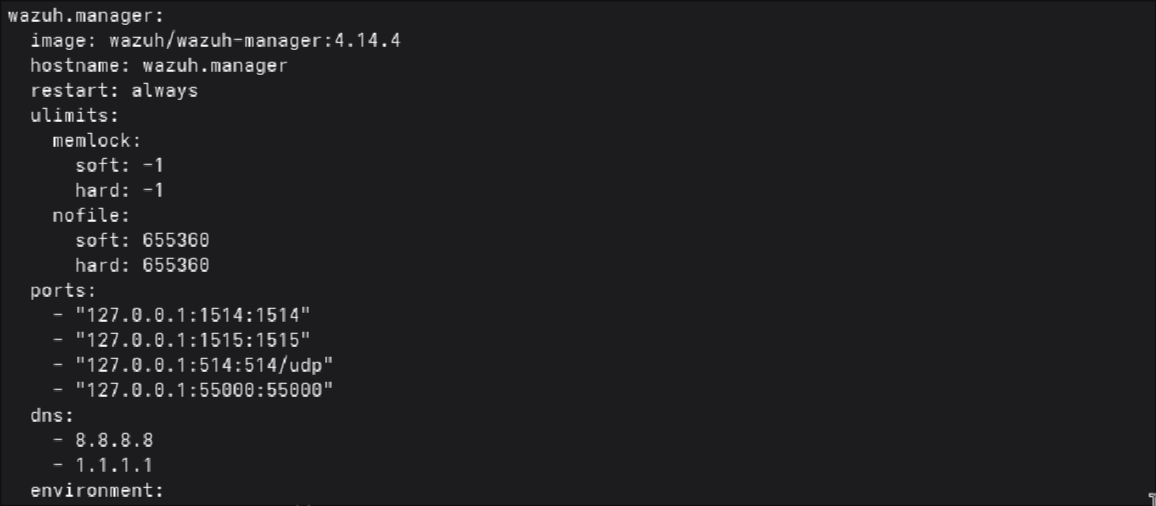
Even with DNS configured in compose, the manager container can’t resolve external hostnames.
Docker daemon has no DNS configured globally
My nftables
forwardchain haspolicy dropblocking container traffic so I will have to whitelist the docker interface with nft rules, if you have something similar do it yourself too else just skip it
Fix Docker daemon DNS:
1
2
3
4
5
6
7
sudo mkdir -p /etc/docker
sudo tee /etc/docker/daemon.json <<EOF
{
  "dns": ["8.8.8.8", "1.1.1.1"]
}
EOF
sudo systemctl restart docker
Get Docker subnet
1
docker network inspect single-node_default | grep Subnet
Then add rules by subnet :
1
2
3
4
sudo nft add rule inet filter forward ip saddr 172.18.0.0/16 accept
sudo nft add rule inet filter forward ip daddr 172.18.0.0/16 accept
sudo sh -c 'nft list ruleset > /etc/nftables.conf'
sudo systemctl enable nftables
Replace 172.18.0.0/16 with your actual subnet from the inspect output. This survives docker compose down and stack restarts since the subnet is defined in the compose file and stays consistent.
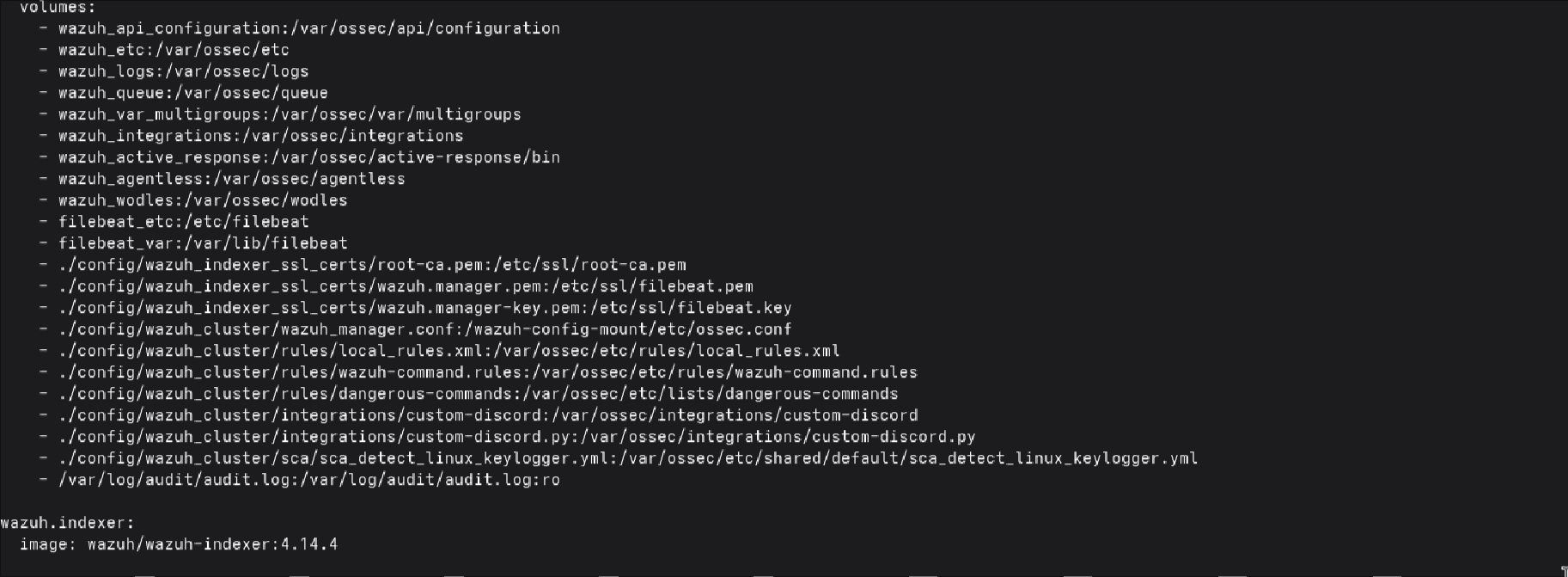
In the docker-compose.yml add these lines under volumes for the manager service. This is important for mapping them for mounting into the container.
1
2
3
4
5
6
7
- ./config/wazuh_cluster/rules/local_rules.xml:/var/ossec/etc/rules/local_rules.xml
- ./config/wazuh_cluster/rules/wazuh-command.rules:/var/ossec/etc/rules/wazuh-command.rules
- ./config/wazuh_cluster/rules/dangerous-commands:/var/ossec/etc/lists/dangerous-commands
- ./config/wazuh_cluster/integrations/custom-discord:/var/ossec/integrations/custom-discord
- ./config/wazuh_cluster/integrations/custom-discord.py:/var/ossec/integrations/custom-discord.py
- ./config/wazuh_cluster/sca/sca_detect_linux_keylogger.yml:/var/ossec/etc/shared/default/sca_detect_linux_keylogger.yml
- /var/log/audit/audit.log:/var/log/audit/audit.log:ro
Install the agent with yay
1
yay -S wazuh-agent
Create the directories for the configs.
1
mkdir -p ~/wazuh-docker/single-node/config/wazuh_cluster/{rules,integrations,sca}
Then use the provided script to place config files in the right position so that wazuh can find them in the docker container.
1
2
cd ~/Configs
bash copy-configs.sh
Load the copied auditd rules.
1
sudo auditctl -R /etc/audit/rules.d/wazuh-command.rules
Now start the docker containers
1
2
3
4
cd ~/wazuh-docker/single-node
docker compose up -d
sleep 90
docker compose ps
Enroll the agent
1
2
sudo /var/ossec/bin/agent-auth -m 127.0.0.1 -p 1515 -A arch-host
sudo systemctl enable --now wazuh-agent
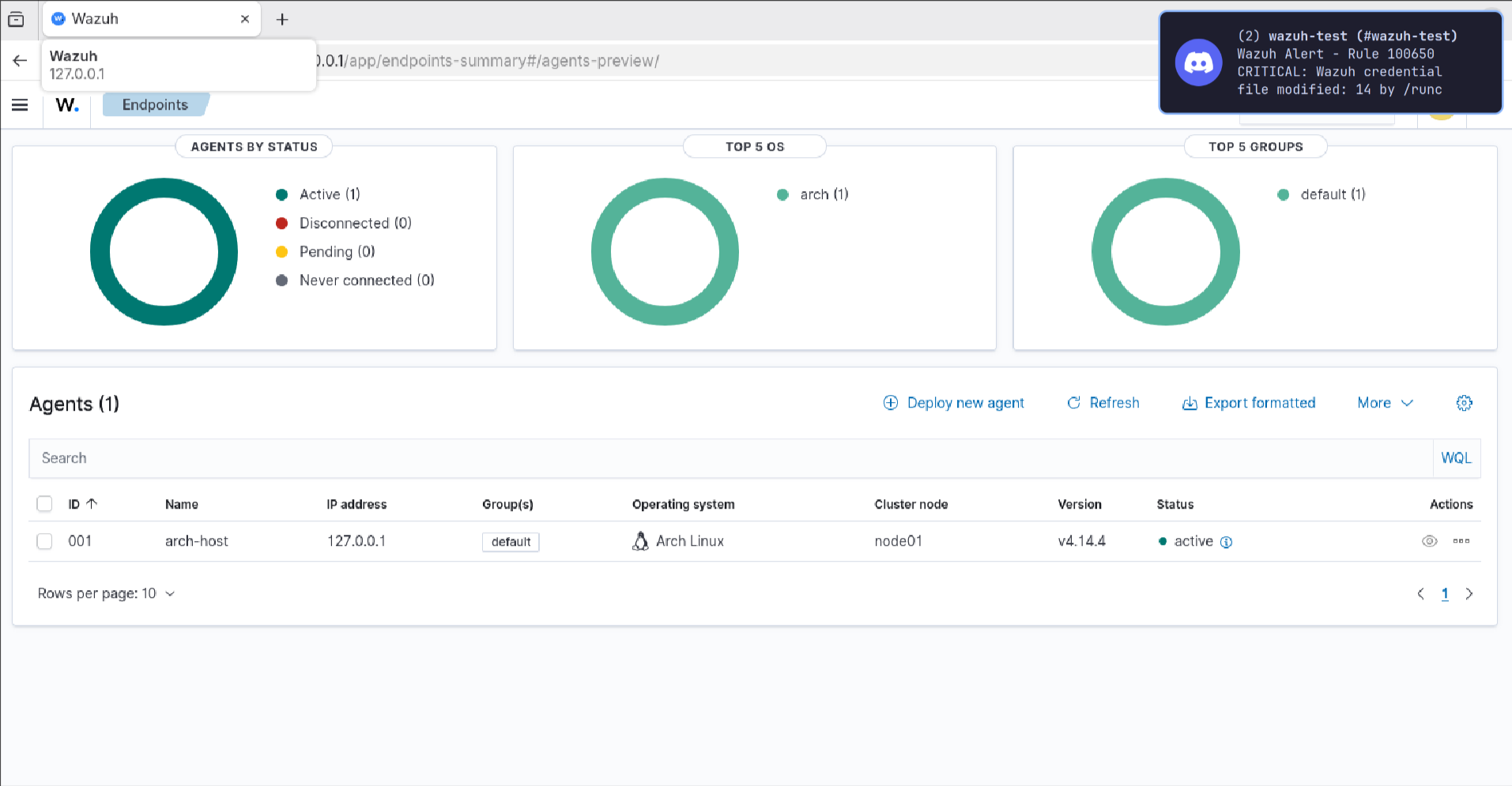
Login and you should be looking at something like this
If any permission issues arise fix them.
e.g. for integration:
1
2
3
4
docker exec single-node-wazuh.manager-1 chown root:wazuh /var/ossec/integrations/custom-discord
docker exec single-node-wazuh.manager-1 chown root:wazuh /var/ossec/integrations/custom-discord.py
docker exec single-node-wazuh.manager-1 chmod 750 /var/ossec/integrations/custom-discord
docker exec single-node-wazuh.manager-1 chmod 750 /var/ossec/integrations/custom-discord.py
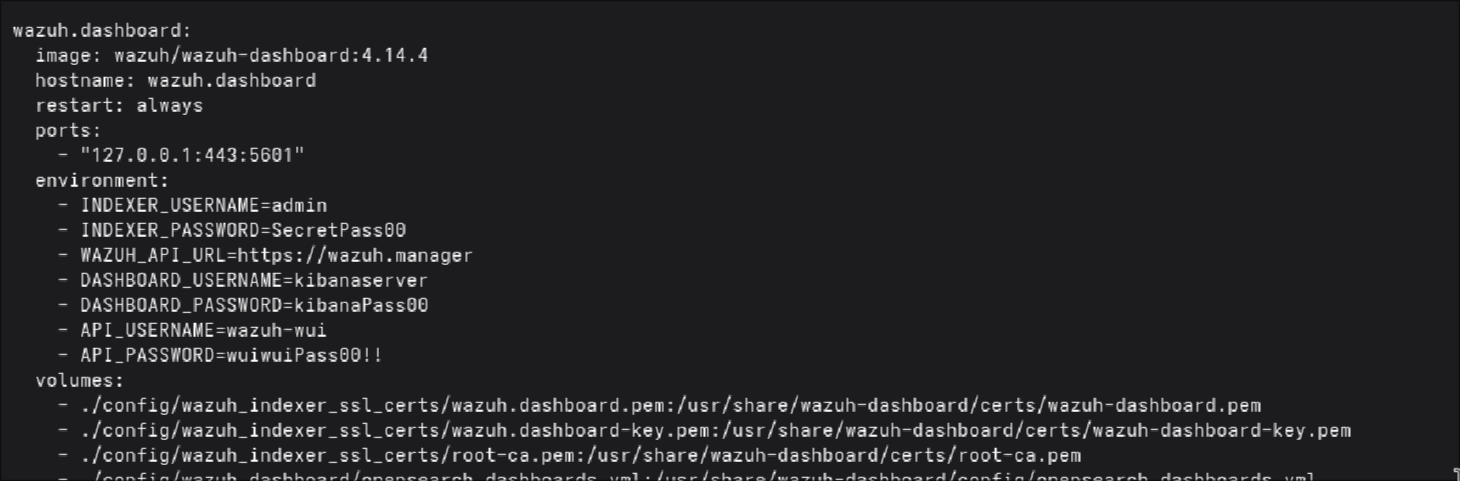
Make sure you change the passwords for the dashboard kibana and the api. For the kibana you need to change them in docker-compose.yml. For the dashboard in the compose file and in the manager conf. For the api in docker-compose.yml and in config/wazuh_dashboard/wazuh.yml, make sure you add a strong password since it might fail with a weak password you might get “Error 5007 - Insecure user password provided” .
You can also Add this to your ~/.zshrc:
1
export HISTCONTROL=ignorespace
Then any command prefixed with a space won’t be saved to history when using cli so the passwords used won’t be stored.
When making any changes to the configs I recommend making them in your Configs directory then placing them for mounting, fix permission issues and restart the containers.
The wazuh_manager.conf staging path - this catches people out when editing configs. Changes to the bind-mounted file don’t take effect on a running container because it’s copied from /wazuh-config-mount on startup. To update a running manager you need docker cp directly.
You are going to want to create a retention policy to delete your logs after 30 days to save disk space. For personal use this is enough you are not obligated by any laws to retain them like in enterprise and after 30 days I think it’s safe to say you don’t need them. Here is link with a simple guide from wazuh official docs for creating it https://documentation.wazuh.com/current/user-manual/wazuh-indexer-cluster/index-lifecycle-management.html .
KNN circuit breaker - if anyone tries to limit indexer memory by lowering JVM heap below 1g they’ll get a crash with IllegalArgumentException: Values less than -1 bytes. Fix is to add to wazuh.indexer.yml:
1
knn.memory.circuit_breaker.limit: 256mb
When updating
1
2
cd ~/wazuh-docker
git fetch --all --tags
you are going to want to stash your docker-compose.yml so
1
2
3
git stash
git checkout v4.x.x
git stash pop
1
2
3
4
cd single-node
docker compose down
docker compose up -d
docker compose ps
If you remove containers with docker compose down -v you will need to re-enroll the agent.
This was done on Arch Linux but it can be applied on Ubuntu or any other distro just as well with minimum modifications needed.
All the necessary config files can be found in my github repo https://github.com/heeeyaaaa/wazuh-homelab
Running wazuh in docker this way makes it a practical portable solution easy to setup other devices or in event of system rebuilding.
Thank you for reading.